
Customer loginBook a demo

Cyber rating,
with AI that helps you fix it.

2-in-1Cyber rating + AI Fix Assistant, in one

ExyGuard gives you a full outside-in cyber score of your business, and an AI Fix Assistant that tells you, in plain words, what to fix first and how.

See what attackers see.
Fix what matters first.

  • 2-in-1: cyber score review and AI fixes in one place
  • One 0–100 score with evidence for every finding.
  • Dozens of risk factors + Exposure Map, checked from the outside
  • Ready-to-follow fix steps, tracked until solved
  • Monitoring, with alerts to keep you updated.

Nothing to install. A turnkey service with nothing to set up or configure.

Cyber rating + AI Fix AssistantContinuous monitoring
Fixed & verified ✓
portal.exyguard.com · example.com
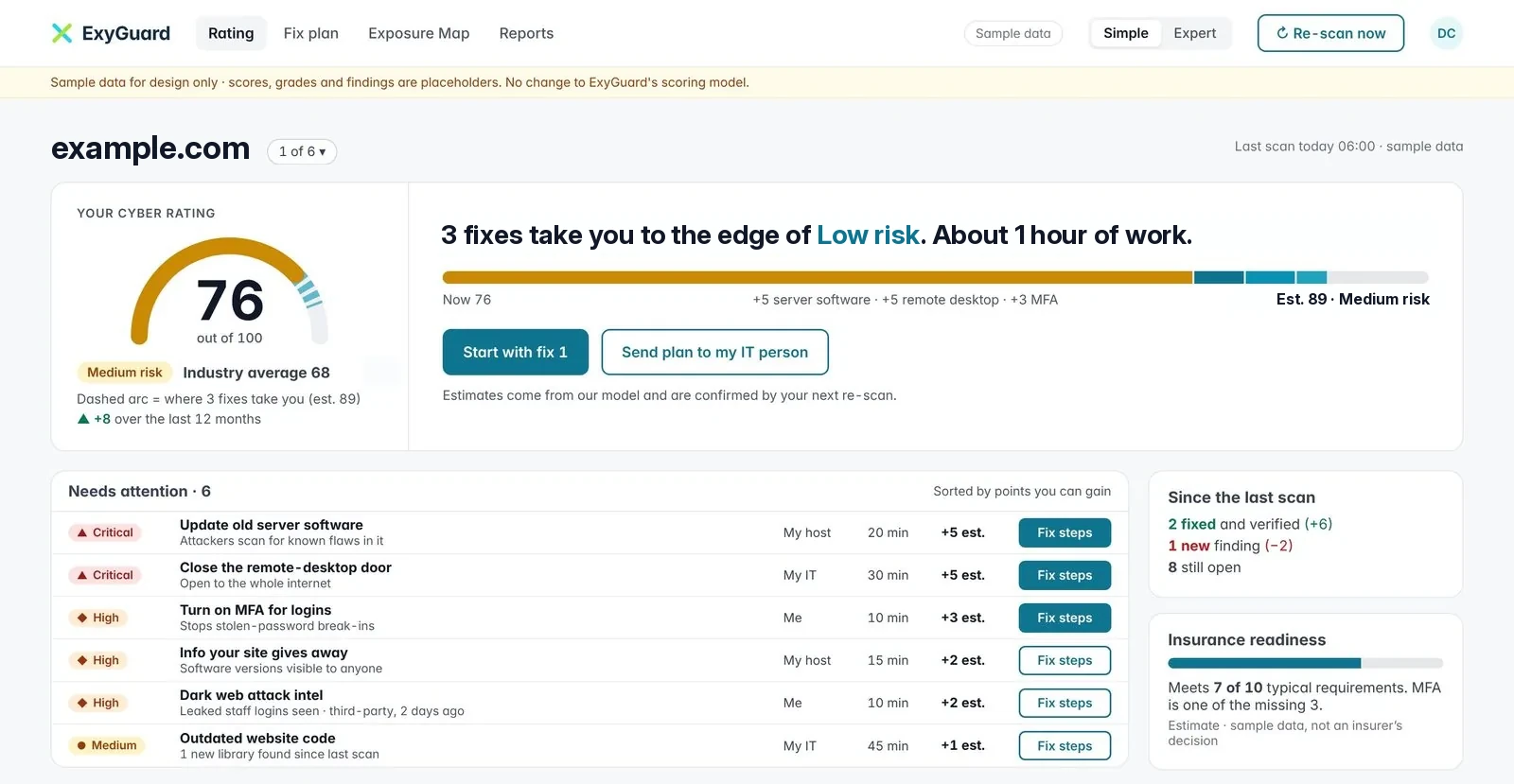
ExyGuard dashboard for the sample site example.com: overall rating 76 out of 100, 3 fixes take you to the edge of Low risk, est. 89 Medium risk, Needs attention list, since the last scan and insurance readiness
Example screen · example.com is sample data
AI Fix Assistant
Example
How do I fix the expiring certificate?
Assistant: 3 quick steps:
  1. Open your hosting control panel
  2. Click “Renew SSL” and turn on auto-renew
  3. Press “Check again”
✓ Re-scan verified · finding closed

Your cyber rating + your AI Fix Assistant

See your external attack surface, fix what matters first, and track it until solved.

1 · Full external cyber rating

See where you stand

Example score 62, High risk

Dashed arc: where 3 fixes take you (est. 75, Medium risk)

Example score
CriticalSoftware updates+5 est.
HighOpen ports+5 est.
HighLogins without MFA+3 est.
Domains Subdomains Servers Email Web apps Certificates Exposed services
  • Your full outside-in attack surface
  • One 0–100 score, evidence for every finding
  • Prioritized by real risk
2 · AI Fix Assistant

Know exactly what to do

Example
How do I fix the expiring certificate?
Assistant: 3 quick steps:
  1. Open your hosting control panel
  2. Click “Renew SSL” and turn on auto-renew
  3. Press “Check again”
✓ Re-scan verified · finding closed
  • Step-by-step fixes in plain language
  • Every finding, tailored to your setup
  • Re-scan proof you can share

See it. Fix it. Prove it.

You can’t protect what you don’t know.

Find your weak spots before hackers do. ExyGuard maps your business's external cyber exposure, then our AI Fix Assistant helps you fix it.

A score alone

  • Findings written for security experts
  • A number that doesn't say what to fix first
  • Little context on why it matters to your business
  • Changes since the last scan are easy to miss

With ExyGuard

  • Plain-language steps for each finding
  • AI guides you through the fixes
  • Re-scan shows when a finding is resolved
  • Monitoring, with alerts to keep you updated.

Outside-in attack surface rating, nothing to install

1Discovery & rating

Non-intrusive

We check only what's publicly visible about your business. No agents to install, no access needed.

Dozens of risk factors

Plus an Exposure Map of everything you have online: email, certificates, open ports & exposed services, software updates, leaked passwords and more.

Email securityCertificate renewalDomain settingsOpen ports & exposed servicesSoftware updatesLeaked passwords…and more

One clear score

One 0–100 score, with evidence for each finding. Monitoring, with alerts to keep you updated. A re-scan shows when a finding is resolved.

75/100 · Medium risk

Example

2AI Fix Assistant

AI Fix Assistant, built into every finding

Turn invisible external risk into a clear fix list. Tick it off, watch your score climb.

Example score

High risk · 0 of 3 fixes done

Dashed arc: est. 75, Medium risk, after 3 fixes (+5, +5, +3)

1

See it

Everything of yours the internet can see, rated.

2

Fix it

Step-by-step AI guidance for your setup.

3

Prove it

Re-check confirms the fix. Shareable “fixed and verified” proof.

Example · animated demo
Finding · example.com

Email spoofing protection is off

Anyone could send email that looks like it came from you.

Needs a fix
AI Fix AssistantHere's how to switch it on (about 10 minutes):
  1. Open your DNS settings at your domain provider
  2. Add a TXT record named _dmarc
  3. Paste v=DMARC1; p=quarantine and save
  4. Press “Check again”. We'll confirm it worked
High risk
0 of 3 fixes done
Example score · est. 75 (Medium risk) after 3 fixes
3 fixes take you to the edge of Low risk. About 1 hour of work.
Now: 76 · Medium risk+5 Update old server software · +5 Close the remote-desktop door · +3 Turn on MFAAfter: est. 89 · Medium risk
Book a demo

Example (the example.com screen above: 76 + 5 + 5 + 3 = est. 89) · estimates come from our model and are confirmed by your next re-scan.

One platform. Four ways to cut cyber risk.

Small businesses

Pass customer and insurer security checks without an IT team. Get a 0–100 score, and the AI Fix Assistant tells you exactly what to fix first.

Book a demo

MSSPs & MSPs

Scan every client from the outside in and turn findings into billable remediation work, with fix steps ready for your team.

Become a partner

Enterprise vendor risk

Score your suppliers across dozens of risk factors + Exposure Map, and send them fix guidance instead of more questionnaires.

Book a demo

Cyber insurers

Underwrite with an outside-in score and evidence for every finding, then help policyholders fix issues before they become claims.

Discuss a pilot

Take a closer look

Pass security checks without hiring IT

Think you're too small to be a target? Think again.

Book a demo
  • Nothing to install, nothing to configure
  • One clear 0–100 score across dozens of risk factors + Exposure Map
  • AI Fix Assistant gives plain-language steps, no security degree needed
  • Re-check proof to share with customers and insurers

FAQ

What do you need from me?

Just your business name and the web addresses you use. We look from the outside, the way an attacker would, so there is nothing to install.

How is the score worked out?

We check your internet-facing assets across dozens of risk factors plus your Exposure Map, and give one 0–100 score with High, Medium or Low risk. Every finding comes with its evidence.

Is the scan safe?

Yes. It is safe and non-intrusive: we only look at what is already visible from the internet, with no access to your systems.

How does the AI Fix Assistant work?

For each finding it gives step-by-step fix instructions in plain language, tailored to your setup. When you are done, a re-scan checks the fix and closes the finding.

See your business the way attackers do, and fix the weak spots before they cost you.

Our mission

Clear exposure, guided fixes, verified proof.

See it. Fix it. Prove it.

Book a demo and see continuous monitoring with the AI Fix Assistant.

Book a demoCustomer login

Or email [email protected]